Mermaid Diagram Support
JSONFiddle renders Mermaid diagram syntax as interactive, zoomable diagrams. Paste or type Mermaid syntax, and JSONFiddle auto-detects the format and renders the diagram in the right panel.
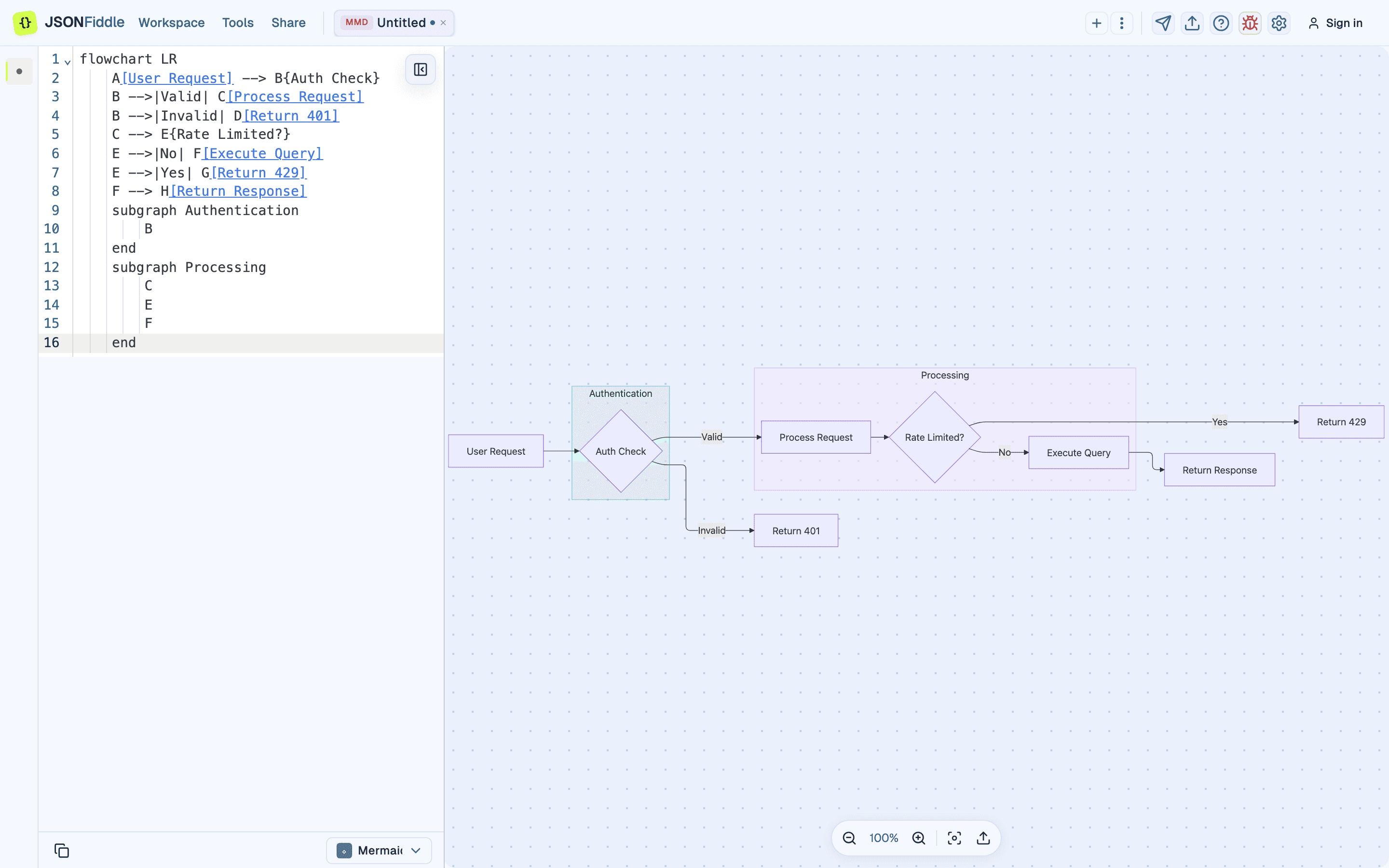 Screenshot: A Mermaid flowchart rendered in JSONFiddle's right panel.
Prerequisites
- Basic understanding of Mermaid syntax (this guide includes examples for every diagram type).
- JSONFiddle open in a browser tab.
Getting Started with Mermaid
Step 1: Create a New Tab
Press Alt+N or click Workspace > New tab.
Step 2: Write or Paste Mermaid Syntax
Type or paste Mermaid syntax into the code editor. JSONFiddle detects the Mermaid format automatically.
flowchart LR
    A[Start] --> B{Decision}
    B -->|Yes| C[Action A]
    B -->|No| D[Action B]
    C --> E[End]
    D --> E
Step 3: Interact with the Diagram
| Action | How |
|---|---|
| Pan | Click and drag the diagram background. |
| Zoom in/out | Scroll the mouse wheel, or use the control buttons. |
| Center view | Press Shift+1. |
| Fit to viewport | Press Shift+2. |
Screenshot: A Mermaid flowchart rendered and ready to interact with.
Supported Diagram Types (19 Types)
JSONFiddle supports all standard Mermaid diagram types. Each type uses a specific keyword as its first line.
1. Flowchart
The most common diagram type. Describes directed graphs with nodes and edges.
flowchart TD
    Start([Start]) --> Input[/Get Input/]
    Input --> Process[Process Data]
    Process --> Decision{Valid?}
    Decision -->|Yes| Output[/Display Result/]
    Decision -->|No| Error[Show Error]
    Error --> Input
    Output --> End([End])
Keywords: flowchart or graph
Direction options: LR (left-right), RL (right-left), TD/TB (top-down), BT (bottom-top)
Node shapes:
| Syntax | Shape |
|---|---|
A[text] | Rectangle |
A(text) | Rounded rectangle |
A([text]) | Stadium (pill) |
A{text} | Diamond (decision) |
A{{text}} | Hexagon |
A[/text/] | Parallelogram |
A((text)) | Circle |
2. Sequence Diagram
Shows interactions between actors over time.
sequenceDiagram
    autonumber
    participant Client
    participant API as API Gateway
    participant Auth as Auth Service
    participant DB as Database

    Client->>API: POST /login
    API->>Auth: Validate credentials
    Auth->>DB: SELECT user WHERE email=?
    DB-->>Auth: User record
    Auth-->>API: JWT token
    API-->>Client: 200 OK {token}

    Note over Client,API: Subsequent requests include the JWT

    Client->>API: GET /profile (Bearer token)
    API->>Auth: Verify JWT
    Auth-->>API: Valid
    API->>DB: SELECT profile
    DB-->>API: Profile data
    API-->>Client: 200 OK {profile}
3. Class Diagram
UML class diagrams with inheritance and relationships.
classDiagram
    class Animal {
        +String name
        +int age
        +makeSound() void
        +move() void
    }
    class Dog {
        +String breed
        +fetch() void
        +bark() void
    }
    class Cat {
        +bool isIndoor
        +purr() void
        +climb() void
    }
    class Parrot {
        +String[] vocabulary
        +speak(String word) void
    }
    Animal <|-- Dog : extends
    Animal <|-- Cat : extends
    Animal <|-- Parrot : extends
    Dog "1" --> "*" Cat : chases
4. State Diagram
State machines and transitions.
stateDiagram-v2
    [*] --> Idle
    Idle --> Processing : Submit
    Processing --> Validating : Parse input
    Validating --> Processing : Invalid (retry)
    Validating --> Approved : Valid
    Approved --> Completed : Finalize
    Completed --> [*]

    state Processing {
        [*] --> Parsing
        Parsing --> Transforming
        Transforming --> [*]
    }
5. Entity Relationship Diagram
Database entity relationships.
erDiagram
    CUSTOMER ||--o{ ORDER : places
    CUSTOMER {
        int id PK
        string name
        string email UK
    }
    ORDER ||--|{ LINE_ITEM : contains
    ORDER {
        int id PK
        date created_at
        string status
    }
    PRODUCT ||--o{ LINE_ITEM : "included in"
    PRODUCT {
        int id PK
        string name
        decimal price
    }
    LINE_ITEM {
        int order_id FK
        int product_id FK
        int quantity
    }
6. Gantt Chart
Project timelines and task scheduling.
gantt
    title Q2 Product Roadmap
    dateFormat YYYY-MM-DD
    axisFormat %b %d

    section Design
    User Research       :done, des1, 2024-04-01, 14d
    Wireframes          :done, des2, after des1, 10d
    High-Fidelity Mocks :active, des3, after des2, 12d

    section Development
    API Development     :dev1, after des2, 20d
    Frontend Build      :dev2, after des3, 18d
    Integration         :dev3, after dev1, 10d

    section Testing
    QA Testing          :test1, after dev3, 14d
    Beta Launch         :milestone, after test1, 0d
7. Pie Chart
Proportional data visualization.
pie title Monthly Expenses
    "Rent" : 1500
    "Food" : 400
    "Transport" : 200
    "Utilities" : 150
    "Entertainment" : 100
    "Savings" : 650
8. Git Graph
Git branch and merge visualizations.
gitgraph
    commit id: "Initial"
    branch develop
    checkout develop
    commit id: "Feature A"
    commit id: "Feature B"
    checkout main
    merge develop id: "Release v1.0"
    branch hotfix
    commit id: "Fix bug"
    checkout main
    merge hotfix id: "Patch v1.0.1"
    checkout develop
    commit id: "Feature C"
    checkout main
    merge develop id: "Release v1.1"
9. Mindmap
Hierarchical idea maps.
mindmap
    root((Project Planning))
        Research
            User Interviews
            Competitor Analysis
            Market Trends
        Design
            Wireframes
            Prototypes
            Design System
        Development
            Frontend
                React
                TypeScript
            Backend
                Node.js
                PostgreSQL
            Infrastructure
                AWS
                Docker
        Launch
            Beta Testing
            Marketing
            Documentation
10. Timeline
Chronological event sequences.
timeline
    title History of Web Frameworks
    2005 : Ruby on Rails
         : Django
    2010 : AngularJS
         : Backbone.js
    2013 : React
    2014 : Vue.js
    2016 : Angular 2+
    2020 : Next.js 10
         : Svelte Kit
    2023 : React Server Components
         : Astro 3.0
11. User Journey
User experience journey maps.
journey
    title Customer Purchase Journey
    section Discovery
        Visit website: 5: Customer
        Browse products: 4: Customer
        Read reviews: 3: Customer
    section Decision
        Compare options: 3: Customer
        Add to cart: 4: Customer
    section Purchase
        Enter payment: 2: Customer
        Confirm order: 5: Customer
    section Post-Purchase
        Receive confirmation: 5: Customer, System
        Track delivery: 4: Customer
        Receive product: 5: Customer
12. Kanban
Task board visualization.
---
config:
  kanban:
    ticketBaseUrl: 'https://issues.example.com/'
---
kanban
    Todo
        id1[Design landing page]
        id2[Write API docs]
    In Progress
        id3[Build auth flow]
        id4[Database migration]
    Review
        id5[Payment integration]
    Done
        id6[Setup CI/CD]
        id7[Configure monitoring]
13. Block Beta
Block-based architecture diagrams.
block-beta
    columns 3
    Frontend["Frontend\nReact App"]:1
    space:1
    CDN["CDN\nCloudFront"]:1
    space:3
    API["API Gateway"]:1
    Auth["Auth Service"]:1
    space:1
    space:3
    DB[("Database\nPostgreSQL")]:1
    Cache[("Cache\nRedis")]:1
    Queue["Message Queue\nRabbitMQ"]:1

    Frontend --> CDN
    Frontend --> API
    API --> Auth
    API --> DB
    API --> Cache
    API --> Queue
14. Sankey Diagram
Flow visualization with proportional widths.
sankey-beta
    Revenue,Product Sales,400
    Revenue,Services,250
    Revenue,Subscriptions,150
    Product Sales,Domestic,300
    Product Sales,International,100
    Services,Consulting,150
    Services,Support,100
    Subscriptions,Monthly,80
    Subscriptions,Annual,70
15. Quadrant Chart
Four-quadrant matrix.
quadrantChart
    title Feature Priority Matrix
    x-axis Low Effort --> High Effort
    y-axis Low Impact --> High Impact
    quadrant-1 Do First
    quadrant-2 Plan
    quadrant-3 Delegate
    quadrant-4 Eliminate
    Search: [0.2, 0.9]
    Dark Mode: [0.3, 0.7]
    Export PDF: [0.6, 0.8]
    Mobile App: [0.9, 0.9]
    Animation: [0.7, 0.4]
    Themes: [0.4, 0.3]
16. Requirement Diagram
Systems engineering requirements.
requirementDiagram
    requirement UserAuth {
        id: REQ-001
        text: Users must authenticate before accessing the system
        risk: high
        verifymethod: test
    }
    functionalRequirement PasswordPolicy {
        id: REQ-002
        text: Passwords must be at least 12 characters
        risk: medium
        verifymethod: inspection
    }
    element AuthModule {
        type: module
    }
    AuthModule - satisfies -> UserAuth
    AuthModule - satisfies -> PasswordPolicy
17. Architecture Diagram
System architecture with icons.
architecture-beta
    group cloud(cloud)[Cloud Infrastructure]

    service api(server)[API Server] in cloud
    service db(database)[Database] in cloud
    service cache(database)[Cache] in cloud
    service queue(server)[Queue] in cloud

    api:R --> L:db
    api:B --> T:cache
    api:L --> R:queue
18. XY Chart
Data visualization with axes.
xychart-beta
    title "Monthly Sales 2024"
    x-axis [Jan, Feb, Mar, Apr, May, Jun, Jul, Aug, Sep, Oct, Nov, Dec]
    y-axis "Revenue (K$)" 0 --> 100
    bar [30, 35, 42, 50, 48, 60, 55, 70, 65, 80, 75, 90]
    line [28, 33, 40, 45, 50, 55, 58, 65, 68, 72, 78, 85]
19. Packet Diagram
Network packet structure.
packet-beta
    0-15: "Source Port"
    16-31: "Destination Port"
    32-63: "Sequence Number"
    64-95: "Acknowledgment Number"
    96-99: "Data Offset"
    100-105: "Reserved"
    106-111: "Flags"
    112-127: "Window Size"
    128-143: "Checksum"
    144-159: "Urgent Pointer"
ELK Layout Engine
For flowchart and graph diagrams, JSONFiddle uses the ELK (Eclipse Layout Kernel) layout engine instead of Mermaid's default dagre layout.
Why ELK?
| Feature | dagre (default) | ELK (JSONFiddle) |
|---|---|---|
| Edge crossings | More | Fewer |
| Node spacing | Uneven | Even |
| Subgraph layout | Basic | Advanced |
| Large graph handling | Fair | Good |
Your flowcharts may look different from the Mermaid live editor (mermaid.live), which uses dagre. The content is identical -- only the visual positioning changes. Other diagram types use their native Mermaid layout engines.
Subgraph Coloring
Flowchart subgraphs receive automatic color-coding from a built-in palette. Each subgraph gets a distinct background color.
flowchart TB
    subgraph Frontend
        A[React App] --> B[State Management]
    end
    subgraph Backend
        C[API Server] --> D[Database]
    end
    subgraph Infrastructure
        E[Load Balancer] --> F[CDN]
    end
    Frontend --> Backend
    Backend --> Infrastructure
Dark Mode Support
| Theme | Behavior |
|---|---|
| Light mode | Diagrams use Mermaid's default light color scheme. |
| Dark mode | JSONFiddle strips Mermaid's inline styles and applies dark-mode-compatible colors for nodes, edges, text, and backgrounds. |
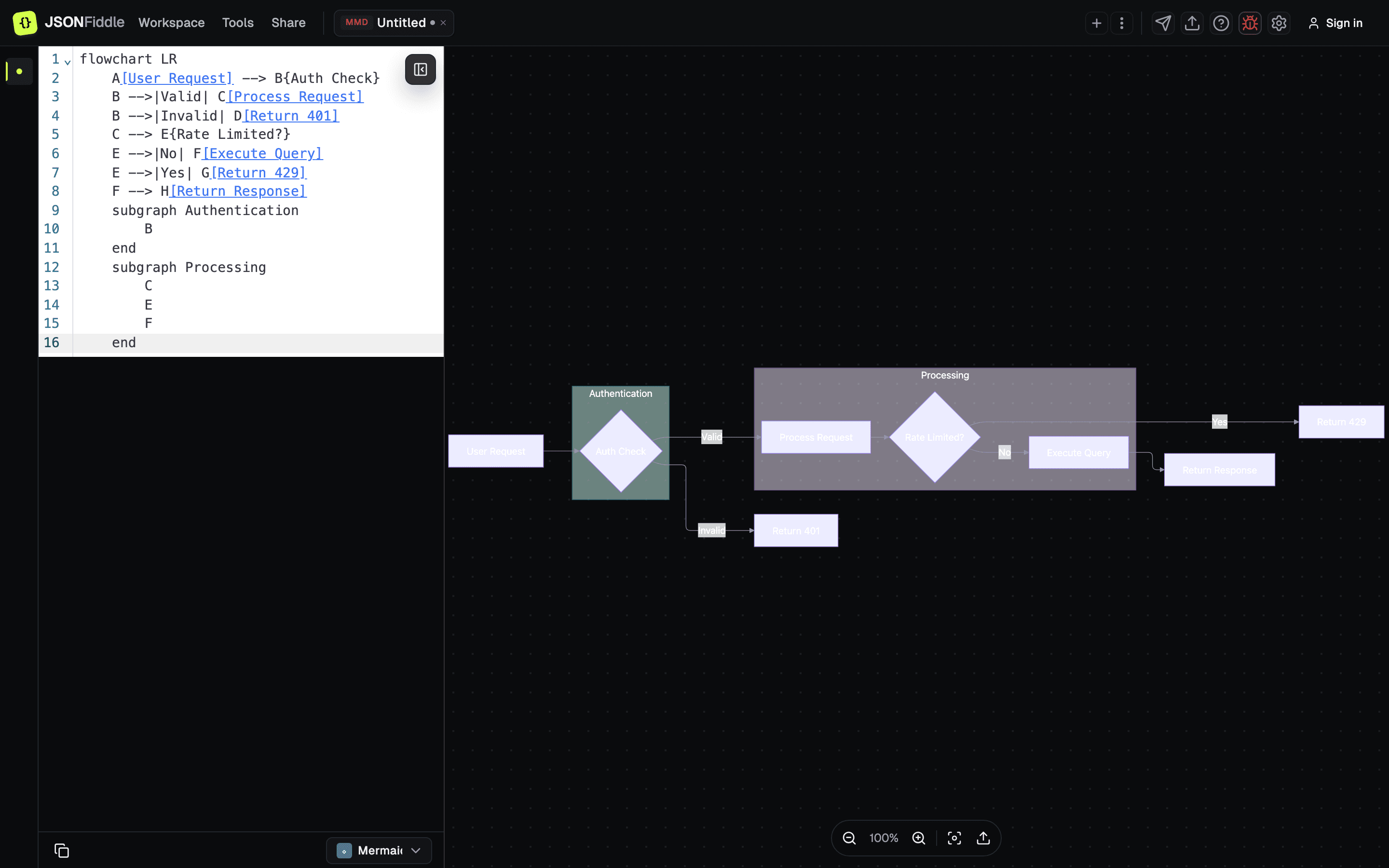 Screenshot: A Mermaid flowchart in dark mode with adapted colors.
Auto-Derived Tab Names
| Diagram Type | Derived Name Example |
|---|---|
| Flowchart | "flowchart LR" |
| Sequence | First participant name |
| Class | "classDiagram" |
| Gantt | Gantt title or "gantt" |
| Others | Diagram type keyword |
Double-click the tab name to override.
Importing and Exporting
Import
- Click Workspace > Add file/data source.
- Select a
.mmdfile. - JSONFiddle opens it in a new tab with the Mermaid format.
Export as Image
- Click the Export icon in the toolbar.
- Click Export diagram image.
- Choose a format:
| Format | Description |
|---|---|
| PNG | Lossless raster image. Best for presentations and documents. |
| JPEG | Smaller file with slight compression. Best for web sharing. |
| SVG | Scalable vector. Best for print and high-resolution displays. |
- Set a filename.
- Click Export.
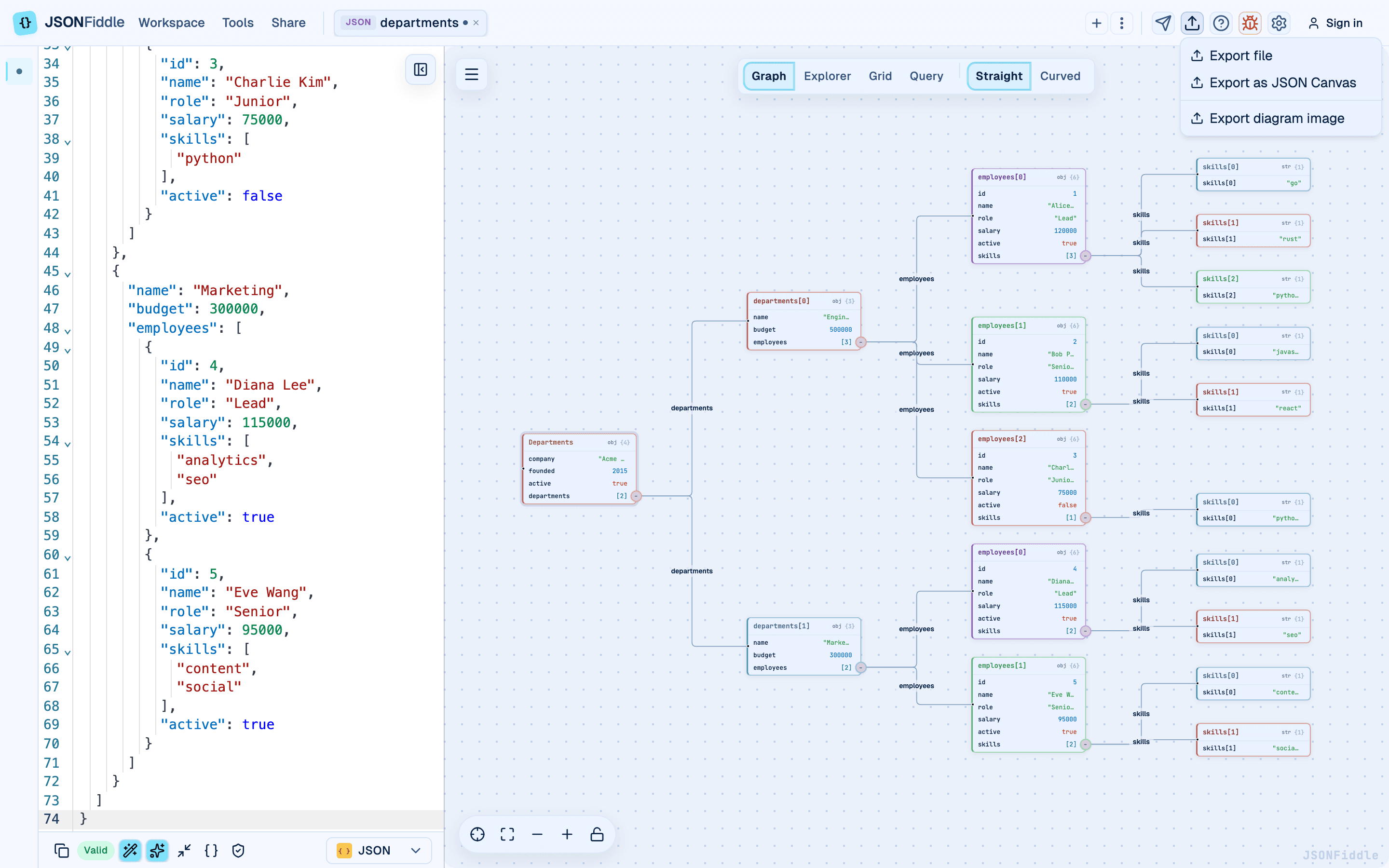 Screenshot: The export modal for saving a Mermaid diagram as PNG, JPEG, or SVG.
Export as File
Click Export icon > Export file to download the raw Mermaid syntax as a .mmd file.
Mermaid vs. JFDG Diagrams
| Feature | Mermaid | JFDG |
|---|---|---|
| Syntax | Text-based DSL | JSON-based schema |
| Node types | Defined by diagram type | Customizable with icons |
| Layout | Automatic (ELK for flowcharts) | Manual or auto-layout |
| Editing | Edit text syntax | Edit JSON schema |
| Best for | Quick diagrams from text | Structured, data-driven diagrams |
Limitations
| Limitation | Details |
|---|---|
| No drag repositioning | Edit the syntax; you cannot drag nodes in the rendered diagram. |
| Query tab disabled | Mermaid is not a data format, so Graph/Explorer/Grid/Query views are unavailable. |
| Large diagrams | Very complex diagrams (hundreds of nodes) may render slowly. |
| Syntax errors | Invalid Mermaid syntax shows an error in the diagram area. |
Troubleshooting: Common Syntax Errors
"Parse error" or blank diagram
| Issue | Example | Fix |
|---|---|---|
| Missing diagram type keyword | Starting with A --> B | Add flowchart LR as the first line. |
| Wrong indentation | No indentation in subgraphs | Indent subgraph contents with 4 spaces. |
| Special characters in labels | A[Label with "quotes"] | Use A["Label with quotes"] or HTML entities. |
| Missing participant declaration | Using undeclared actors in sequence diagrams | Add participant Name before using the actor. |
| Semicolon instead of newline | A --> B; B --> C | Put each connection on its own line. |
"The diagram renders but looks wrong"
- Check the direction keyword (
LR,TD,RL,BT). - Ensure edge syntax matches the diagram type (e.g.,
-->for flowcharts,->>for sequence diagrams). - Check for duplicate node IDs.
"Colors do not match dark mode"
Toggle dark mode off and on again. JSONFiddle's dark mode style injection sometimes needs a re-render.
FAQ
Q: Can I use Mermaid themes or directives?
A: JSONFiddle renders Mermaid with app-aware colors so diagrams stay readable in light and dark mode. Custom %%{init}%% directives may be partially supported, but app theme compatibility takes priority.
Q: Can I edit the diagram by clicking on it? A: No. Edit the syntax in the code editor and the diagram updates automatically.
Q: Which Mermaid version does JSONFiddle use? A: JSONFiddle uses a recent stable Mermaid renderer. If a diagram type or syntax option behaves unexpectedly, compare it with the Mermaid documentation for that syntax.
Q: Can I use Font Awesome icons in Mermaid?
A: Font Awesome icon syntax (fa:fa-icon) is supported if the icons are available in the Mermaid build.
Q: Can I copy the rendered SVG? A: Export as SVG using the export modal.
Related Guides
- Getting Started -- overview of all supported formats.
- Format Conversion -- importing
.mmdfiles and exporting. - Keyboard Shortcuts --
Shift+1(center) andShift+2(fit view) in Diagram view. - Working with Tabs -- auto-derived tab names for Mermaid.
- Export Options -- exporting diagrams as PNG, JPEG, or SVG.
- Dark Mode & Theming -- how Mermaid adapts to dark mode.