JSONFiddle Documentation
JSONFiddle is a visual workspace for API responses, JSON files, webhook payloads, logs, CSVs, schemas, SQL experiments, and custom diagrams.
It is local-first by default: paste data and the browser does the work. When you choose cloud features such as workspace save or secure sharing, JSONFiddle asks before uploading workspace content to JSONFiddle cloud storage.
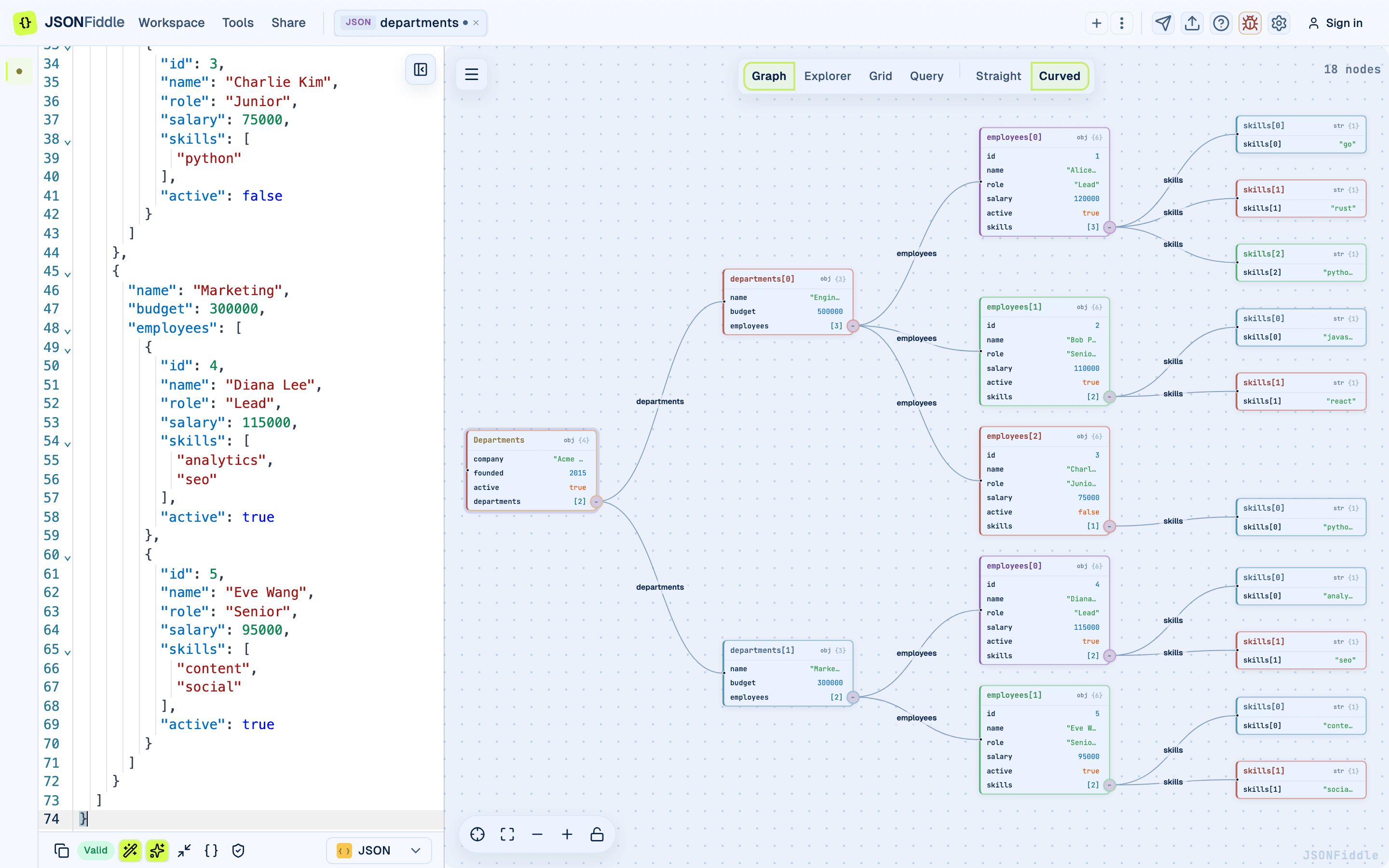 The editor, visual canvas, and multi-view workspace in one screen.
Start With the Job
Recommended Reading Paths
I am new to JSONFiddle
I have a large API response
I need to debug or explain a payload
I need a shareable artifact
I need privacy or support details
Which View Should I Use?
| Task | Best View | Why |
|---|---|---|
| See structure at a glance | Graph | Shows parent-child relationships and expandable branches. |
| Drill through nested fields | Explorer | Tree and column layouts make deep navigation manageable. |
| Inspect arrays as rows | Grid | Source selection, nested tables, column selection, and CSV export. |
| Query with JSONPath/JQ/JSONata | Query | Smart examples adapt to the current data and language. |
| Query multiple tables | SQL | DuckDB runs in the browser against editor tabs and added sources. |
| Build architecture diagrams | Custom diagrams | JFDG supports nodes, groups, icons, fields, labels, and bendable edges. |
| Work with a very large file | Grid or Query | Graph and Explorer intentionally pause on large nested data. |
Large-file note: Chunked Graph and Explorer rendering is planned for paid workspaces. Today, Grid and Query are the safest paths for multi-megabyte payloads.
Guide Map
| Area | Guide |
|---|---|
| Workspace save, local sessions, secure share snapshots | Workspaces & Sharing |
| Graph view, node style, edge style, layout, search, export | Graph View |
| Explorer tree/column browsing and path copying | Explorer View |
| Grid source picker, nested arrays, columns, filters, CSV | Grid View |
| JSONPath, JQ, JSONata, and smart suggestions | Query & Transform |
| DuckDB-powered SQL over JSON/CSV sources | SQL on JSON |
| JFDG custom diagrams and templates | Custom Diagrams |
| All standalone utilities and converters | Toolbox |
| Feedback reporting and safe diagnostics | Feedback & Privacy |
| File, diagram, CSV, package, and share exports | Export Options |
Workflow Demos
Short recordings show common workflows with a visible cursor so you can follow the exact path through the interface.
Privacy Model
JSONFiddle is private by default because most payloads contain real operational data.
- Local editor sessions stay in browser session storage.
- Cloud workspace save requires sign-in and an explicit save action.
- Share snapshots require confirmation before data is uploaded to JSONFiddle cloud storage.
- Feedback reports collect safe diagnostics and intentionally exclude JSON source content.
- Legacy diagram share links remain supported while workspace sharing rolls out.
Read Feedback & Privacy and Workspaces & Sharing before uploading sensitive data.